How to Create a Visual Treatment for Any Text

Updated: Oct 13
Most visual stories start with a script. But plenty of good ideas never arrive in a screenplay format. They show up as a two-line ad concept from a client, a short story you want to turn into a micro movie, a music video treatment scribbled on your phone, a news story you want to tell in an engaging way, or even a poem you want to visualize,
Use ShotKraft's new Shotlist Anything feature to go from an idea to a plan for visual treatment in minutes. Iterate and refine your idea, then print out a plan of content to capture or generate to produce your video.
How does "shotlist anything" actually work
When you paste text into ShotKraft that doesn't read like a script, it first writes a short visual treatment of it: who is on screen, where we are, what physically happens. Then it shotlists that treatment the same way it would shotlist a scene from a screenplay, with shot types, subjects and descriptions.
You never see the in-between step. You paste words, you get shots.
That makes it useful for a lot of formats filmmakers and content creators deal with every week:
Commercial and brand synopses. Turn a client's one-paragraph concept into coverage before the call.
Music video treatments. Go from mood and story beats to a concrete list of setups.
Short stories and prose. See how a scene could be covered before you commit to a full adaptation.
Documentary outlines and interview notes. Sketch B-roll coverage from what your subject told you.
News stories and real events. Plan a recreation, a reenactment or a short inspired by something that really happened.
Rough ideas. A few sentences in plain English are enough to get started.
Poems and spoken word. Find the images inside the lines and plan how to shoot them.
How to shotlist anythig in ShotKraft
Click New Project and choose Copy/Paste Script.
Paste your text into the scene box.
Click Generate. Your shots appear in seconds.
For longer texts, split the piece into scenes with + Add Scene: one paragraph, stanza or story beat per scene. You'll get tighter coverage than if you paste a whole story into one box.
Example 1: Shotlisting a news story
We pasted in one paragraph about a surprise performance in London's West End this weekend, where a star of a hit streaming series joined the cast of an upcoming stage revival days before previews began:
White House Media Ban: CNN, MS NOW, and Politico filed a lawsuit against the administration after Trump barred them from the White House grounds, labeling their reporting as "fake news"
ShotKraft returned six shots:
Shot | Type | Subject | What we see |
1.1 | Establishing | Whit House | Exterior establishing shot of the White House. |
1.2 | Wide | Reporters | Reporters and camera crews gathered in front of the White House grounds |
1.3 | Closeup | Press representative | Press representative speaking about CNN,MS NOW, and Politico filing a law suit |
1.4 | Insert | Papers | Lawsuit papers identifying the media organizations |
1.5 | Medium | Spokeperson | Spokesperson standing at the press conference room in the White House. |
1.6 | Wide | Spokeperson | Spokesperson delivering the "fake news" characterization. |
That's a complete arc: set the location, reveal the players, zero in on one press representative, cut to the legal papers, reveal the second opinion, punch in for the "fake news" comment. All of it pulled out of a news paragraph that is dry and factual.
Then, we generated photorealistic images based on the shots.

Example 2: Shotlisting a commercial synopsis
Client briefs rarely come as scripts. Here's the kind of synopsis a food brand might send over for a 30-second spot:
A grandmother teaches her grandson to fold dumplings. Flour everywhere. He gets it wrong, again and again. Years later, alone in his own tiny kitchen, he folds one perfectly and texts her a photo. She replies with a single heart.
Paste it in as two scenes, the lesson and the years-later payoff, and ShotKraft plans coverage for both timelines. A starting shot list like that is enough to price the shoot and walk into a pitch meeting with a plan instead of a mood board.
Scene 1: The lesson

Scene 2: The pay-off

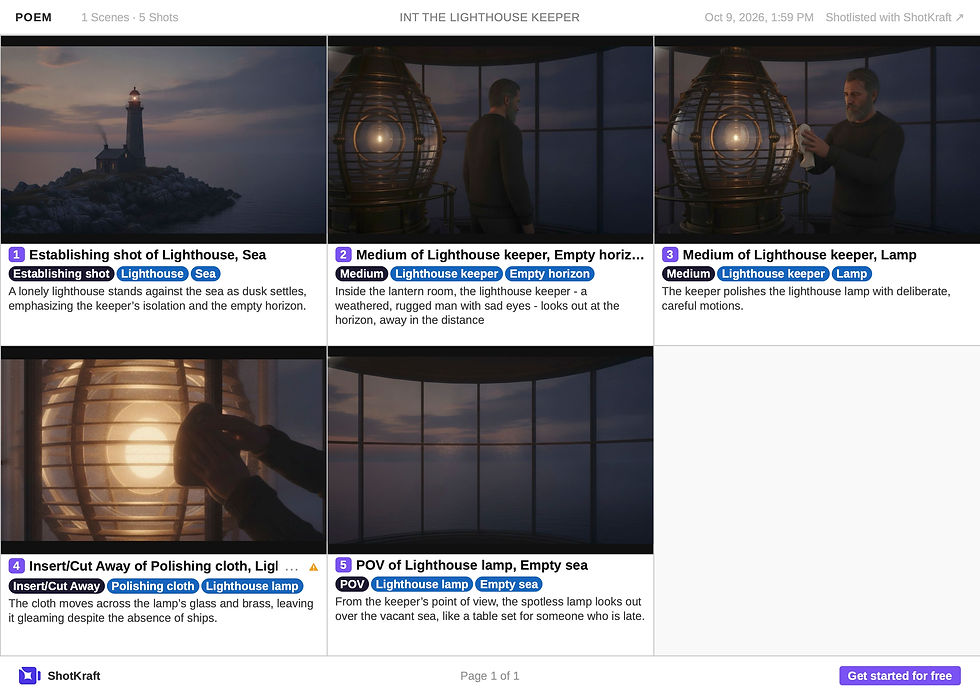
Example 3: Shotlisting a poem
Poetry is almost all image and almost no action, which is why it's hard to plan. Try this one:
The lighthouse keeper counts the ships that never come. He polishes the lamp anyway, the way you set a table for someone who is late.
The trick is that even a poem this short is full of concrete things to film: a lighthouse, an empty sea, a lamp, a ritual. Those are what ShotKraft builds shots around. It's a starting point for a visual poem, a mood piece, a festival short, or a music video.
Tips for better shot lists from non-script text
Be concrete. Who is there, where they are and what physically happens give ShotKraft more to work with than abstract ideas.
One beat per scene. Break long pieces into scenes so each moment gets its own coverage.
Fill in location and time of day. It grounds the shots and lets you filter later in Table View.
Why this matters for indie filmmakers
The hardest part of pre-production is often the jump from "I can see it" to "here's how we'll shoot it." When the source material isn't a script, that jump is even bigger.
Having a shot list shortens that jump. You can react to a brief the same day, test whether a story has a film in it before you write a draft, and show a collaborator something concrete.
Once your shots are in ShotKraft, everything else works the same: edit and reorder shots, generate reference images, invite your crew, and export a clean PDF. Pro users can even remove ShotKraft branding from exports before sending them to a client.
Try it on something that isn't a script
Pick the last idea that came to you: a client email, a headline, a poem, or the lyrics of a song. Paste it in and see what ShotKraft sees.




Comments